
First-server Minecraft hosting is renting a place for your shared world to run, with the aim of letting friends play without depending on one person's computer. This guide to cheap minecraft server hosting covers your first paid server, modpack moves from self-hosting, and established communities changing hosts in 2026.
- Newlifehost Minecraft server hosting suits friends who want paid hosting with Paper, Forge or Fabric support.
- Choose cheap minecraft server hosting around your software and world requirements, not the smallest advertised plan.
- For modded Minecraft server hosting, match the Minecraft version, loader and modpack release before uploading your world.
- Keep a separate backup and test the transferred world before asking everyone to switch servers.
Why Minecraft hosting matters for first-server owners
A friends-only server still needs someone to manage its world, settings and updates. Paid hosting changes where the server runs; it does not remove those decisions. Your first purchase should make that work understandable rather than hide it behind an unfamiliar panel.
Start with the software options listed by Newlifehost, then compare them with what your group actually plays. A small survival group needs a different setup from friends using a Forge modpack, while an established community must preserve existing player data and configuration.
The right cheap plan is the one that supports your intended setup without forcing you to rebuild it. In 2026, evaluate the panel, hardware specifications, file access and support scope alongside the monthly charge. A low bill does not fix an incompatible mod loader.
How to choose and launch your first paid server
Define what your friends will play
Write down your requirements in a shared note before comparing hosts. You do not need a paid planning tool: the edition, version, software and world details are enough to start a useful conversation.
For a first server, decide whether you want ordinary survival, server-side plugins or a modpack that everyone installs. For a move from self-hosting, record the existing setup rather than starting from memory. For an established community, include permissions, scheduled tasks and integrations that must survive the move.
Give one person responsibility for configuration and another access to the backup instructions. That prevents routine maintenance from depending entirely on whoever first bought the server.
- Record whether your group uses Java Edition or Bedrock Edition.
- List the Minecraft version and required server software.
- Name the exact modpack release or required plugins.
- State whether you are creating a world or transferring one.
- Identify who can change settings and approve updates.
Choose compatible server software
Use the server software's documentation and your modpack's installation instructions first. Identify what your setup requires before shopping for a convenient installation button. A panel cannot make incompatible software compatible.
Paper is an option for a Java server using plugins. Forge and Fabric are mod loaders; select the loader your mods or pack requires. Do not assume a Forge installation accepts Fabric mods, or that a plugin-based server replaces a modpack server.
For a straightforward friends-only world in 2026, start with the software that supports your intended gameplay. Changing software just because a host recommends it creates extra work if your existing mods, plugins or world depend on something else.
- Match the server's Minecraft version to the intended client setup.
- Check whether the pack requires Forge or Fabric.
- Separate required server mods from client-only additions.
- Check each plugin's supported server software and version.
- Record the required Java version from the software documentation.
Compare the plan with your actual requirements
Build a simple comparison sheet using each host's published specifications. Keep RAM allocation, CPU details, storage allowance and transfer terms in separate columns. DDR5 describes memory technology; it does not tell you how much memory your server receives.
Newlifehost Minecraft server hosting specifies DDR5 memory, NVMe storage and a custom panel supporting Paper, Forge, Fabric and other software. Those are relevant features for a first paid server or a modpack move. They do not establish a player-capacity guarantee or prove that every plan fits every pack.
Choose hardware and allocation together, not hardware labels alone. For your 2026 shortlist, read the current plan terms and ask about anything that affects your setup. Verify migration help before treating it as an included service.
- Compare allocated RAM, not just the DDR5 label.
- Record the stated CPU or vCore allocation and any usage limits.
- Check storage capacity separately from the NVMe specification.
- Confirm file access and the available server software.
- Ask how plan changes work before your world needs more resources.
- Confirm what setup and migration support actually covers.
Size the server around the workload
For an existing server, start with its logs and resource readings during normal play. For a new world, use the modpack's published requirements and the host's guidance for your intended setup. Avoid universal RAM-per-player formulas: players, mods, plugins and world activity are different inputs.
A friends-only survival world and a heavily modified server should not receive the same recommendation simply because the groups contain the same number of people. Established communities also need to account for their current configuration rather than selecting a plan from player count alone.
Use a repeatable check after setup. For example, review performance during a 15-minute shared play session; this is a test procedure, not a capacity benchmark. Keep the same activities when comparing configurations so the results remain useful.
- Record memory usage while friends perform typical activities.
- Check logs for crashes, warnings and repeated errors.
- Compare exploration with play around already-built areas.
- Review view distance and simulation distance before adding resources.
- Investigate expensive mods or plugins instead of blaming RAM automatically.
Configure the panel and modpack deliberately
Download server files from the software or modpack's official distribution source. Follow the server installation instructions, which can differ from the client installation instructions. Keep a copy of the original configuration before changing it.
Newlifehost offers a custom panel and Modrinth modpack installation features. The panel provides a shorter setup route for supported packs, but the pack release, loader and Minecraft version still need to match what your friends use. Confirm the intended pack is supported before making that feature your deciding factor.
For your first launch in 2026, change only what you understand. Start the server, read the console, and resolve installation errors before adding optional mods. That gives you a working baseline instead of several simultaneous problems.
- Select the exact pack release rather than an unspecified latest version.
- Follow the required server-side installation process.
- Check the configured Java version against the pack requirements.
- Read startup output before attempting to join.
- Enable the appropriate allowlist for a private group.
- Save a working configuration before making further changes.
Move an existing world without losing the original
Use the manual route first: stop the old server cleanly and copy its required files to a separate location. Follow your server software's documentation for world storage, including dimension data. Do not assume the visible world folder contains everything your setup needs.
For a modpack move, preserve required server mods and configuration alongside the world. For an established community, include permissions and plugin data where applicable. Ask the receiving host what migration help covers, what you must provide, and which tasks remain yours.
Keep 2 backup copies in separate locations before changing the destination. This is a recommended safeguard, not a claim about a host's backup service. Test the transferred world before sharing its new address, and retain the original files until the checks pass.
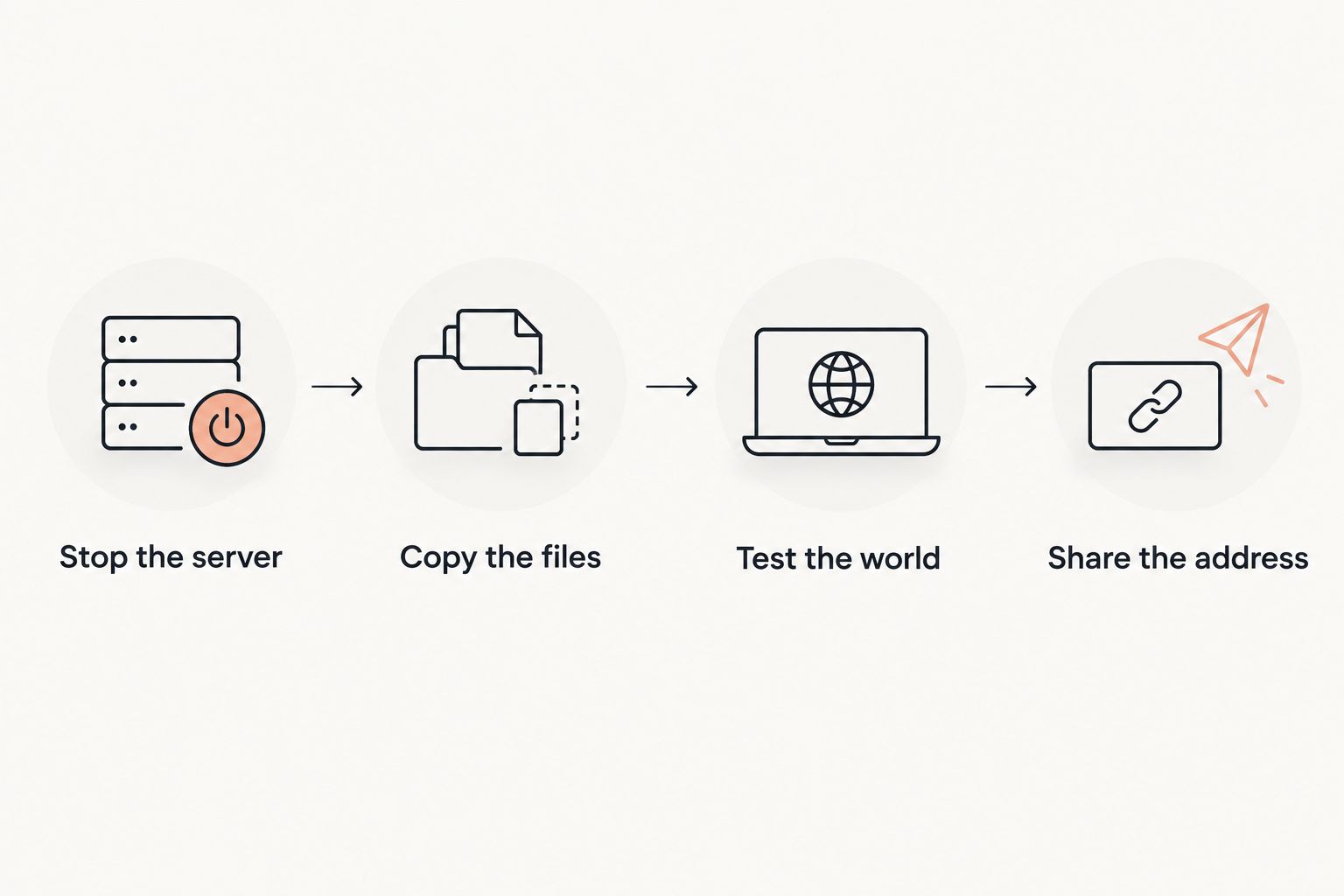
- Stop the server cleanly before taking the transfer copy.
- Copy the files required for worlds, configuration and player data.
- Preserve mod, plugin and permission files where your setup requires them.
- Test the world for inventories, builds, dimensions and permissions.
- Share the address only after the destination passes those checks.
Test the server before committing your community
Use the console, server logs and a short shared session before making your new server the permanent destination. These checks cost nothing beyond your time. They also give support a specific problem to investigate if something fails.
Ask friends to join using the intended client setup. Visit familiar builds, open inventories, use required commands and check dimension travel. For a fresh server, test the gameplay you actually intend to use rather than merely confirming that the loading screen disappears.
Newlifehost's support comes from the team running New Life SMP. Bring that team a clear description and relevant logs; community experience is useful context, not a promise of a particular response time or repair outcome.
- Run a 10-minute joining and permissions check with your friends.
- Verify that required mods or plugins behave as expected.
- Confirm who can access the panel and server files.
- Create 1 fresh backup after validating the setup.
- Document how to restore that backup before you need it.
- Keep the old setup available until your transfer checks are complete.
Compare hosting options for your first server
Choose the option that fits your maintenance responsibilities as well as your gameplay. This 2026 comparison separates setup routes without treating any one route as universally best. Check current billing terms directly before buying.
| Option | Best for | Main advantage | Key limitation |
|---|---|---|---|
| Self-hosting | Friends who want direct control and can maintain the machine | You control the local files and configuration | You handle connectivity, system maintenance and keeping the host machine running |
| Newlifehost paid hosting | Friends and modpack players wanting supported software and a custom panel | DDR5/NVMe hardware, Paper/Forge/Fabric support and Modrinth installation features | You still need to verify plan allocation, pack support and migration scope |
| A rented general-purpose server | Administrators comfortable managing the operating system | You manage the server environment directly | Minecraft installation, security, updates and troubleshooting remain your responsibility |
For a small first-server group, prioritize an understandable setup and compatible software. For modpack players leaving self-hosting, prioritize the exact pack release and file transfer. For an established community, prioritize preserving configuration and testing the destination before switching everyone over.
Common mistakes first-server owners make
Buying from player count alone
Player count describes the group, not the complete workload. Include your software, mods, plugins and intended activities when asking for a plan recommendation. An existing community should bring current resource readings and configuration details.
Confusing a modpack installer with universal compatibility
An installation feature helps with supported packs; it does not settle every version or loader requirement. Confirm the exact release and keep your friends' clients aligned with the server. Treat optional additions as separate compatibility decisions.
Moving the world but leaving its dependencies behind
A transferred map is not a complete modded or plugin-based server. Preserve required configuration, player data and dependencies, then check inventories and permissions on the destination. Keep the original copy untouched while testing.
Assuming hosting includes all administration
Paid hosting does not automatically assign someone to approve updates, manage access or restore backups. Decide who owns those tasks before launch. Ask support about specific responsibilities rather than relying on the word managed.
FAQ
What's the best cheap Minecraft server hosting for a first server with friends?
The best fit supports your intended software, gives you understandable administration tools and matches your workload. Newlifehost is an option for friends wanting paid hosting with Paper, Forge or Fabric support; verify the selected plan and setup requirements before buying.
How much RAM does our first Minecraft server need?
Choose RAM from your software and workload requirements, not player count alone. For a modpack, start with its published requirements; for an existing server, use resource readings from normal play and discuss them with the host.
Is paid hosting better than self-hosting for friends?
Paid hosting fits groups that want the server to run independently of a friend's computer. Self-hosting fits owners who want direct control and can handle connectivity and machine maintenance. Both routes still require server administration.
Can we move our existing Minecraft world to a paid host?
You can transfer an existing world when the destination supports its required software and configuration. Stop the source server, preserve the necessary files and test the destination before switching players. Confirm any offered migration help separately.
Should we choose Paper, Forge or Fabric?
Choose Paper for a compatible plugin-based setup, and choose Forge or Fabric according to your modpack's requirements. These options are not interchangeable substitutes. Match the Minecraft version, loader and required client setup.
Does a Modrinth installer remove the need to configure a modpack?
A Modrinth installer simplifies installation for supported packs, but version and configuration checks still matter. Confirm the exact release, Java requirements and client setup before inviting friends to join.
What should we check before switching an established community?
Check world data, inventories, permissions, dimensions and required plugins or mods before switching the community. Retain the original files and test a backup restore process. Verify migration responsibilities with the receiving host.
One last thing
Prove that you can restore the world, not just download it. Before your group treats the server as permanent, restore a backup into a separate test setup and check the files that matter. A backup you cannot restore is not a finished recovery plan.
For your 2026 purchase, take your software requirements, migration checklist and support questions to the host before choosing a plan. Put down roots only after the setup works.