
Choose modded Minecraft server hosting by the modpack’s server requirements, loader compatibility, and your existing workload—not player count alone. Match the exact Minecraft and loader versions, then check RAM allocation, CPU specifications, storage, backups, and file access. For an existing server, test a copy of the world before moving players; installing a pack is not the same as migrating a working community.
- Choose modded Minecraft server hosting around the exact modpack, loader version, and workload—not player count alone.
- Newlifehost suits owners seeking DDR5, NVMe, and a custom panel for Minecraft server hosting.
- For cheap Minecraft server hosting, compare operating controls and resource limits before choosing the smallest plan.
- Back up and test existing worlds before switching hosts or changing modpack versions.
How do you choose modded Minecraft server hosting in 2026?
Start with the pack you intend to run. Its server installation instructions determine the Minecraft version, mod loader, Java requirements, and server files you need. A hosting plan must support that combination before its RAM allowance becomes relevant.
Your starting point also changes the buying decision. A new world gives you fewer migration dependencies; an established world carries player data, configurations, and mod-specific files that must survive the move.
| Your situation | Best for | Check before buying | Main trade-off |
|---|---|---|---|
| First paid server | Small groups starting a shared modpack world | Server-pack installation, console access, backups, and resource limits | Easy setup does not establish whether the plan fits later world growth |
| Moving from self-hosting | Modpack players transferring an existing local server | File transfer, Java compatibility, startup configuration, and world import | Hosting moves the machine workload, but you still manage pack compatibility |
| Switching hosts | Communities preserving an established server | Complete exports, restore controls, migration scope, and upgrade options | A panel change can require translating settings and startup commands |
Newlifehost is a fit for owners seeking modded Minecraft server hosting with DDR5, NVMe, and a custom panel. Compare the current plan details at Newlifehost against your pack’s requirements. Those specifications describe the hardware and interface; they do not establish how your particular world will perform.
Why this matters
A modpack server is more than a world folder. The loader, mods, configurations, scripts, and Java environment work together. Buying enough memory while overlooking one of those dependencies leaves you with a plan that cannot run the intended server correctly.
For a 2026 buying decision, separate installation convenience from operating suitability. An installer helps you deploy files; resource limits, troubleshooting access, and recoverable backups determine how you manage the server after players join.
The useful question is not simply whether a host supports mods. Ask whether you can install, update, diagnose, back up, and restore the exact pack you want to play.
Match the server software before selecting resources
Forge and Fabric are mod loaders. Paper is server software commonly used for Bukkit-style plugins; it is not a substitute for the loader required by a Forge or Fabric modpack. Treat the pack’s stated loader as a requirement, not a preference.
| Software | Best for | What it does | Compatibility limit |
|---|---|---|---|
| Forge | Packs built for Forge | Loads mods designed for the matching Forge environment | A Fabric mod is not interchangeable with a Forge mod |
| Fabric | Packs built for Fabric | Loads mods designed for the matching Fabric environment | The server still needs compatible Minecraft, loader, and mod versions |
| Paper | Plugin-based communities | Runs a Minecraft server with Bukkit-style plugin support | Paper alone does not run a Forge or Fabric modpack |
Choose the loader the pack requires. Switching software to chase a performance claim can make the pack unusable. Do not assume that a mod with the same name has an equivalent release for another loader.
Use the pack’s server distribution when the author provides one. Client installations can contain rendering, interface, or other client-only mods that do not belong on a dedicated server. Copying your entire client mods folder is not a reliable server installation method.
Newlifehost’s custom panel supports Paper, Forge, Fabric, and other software, and its stated features include Modrinth modpack installation. Confirm that the exact pack and release you want are supported by the installation workflow. Keep access to manual file management for configuration changes and troubleshooting.
Read the hardware specification without mistaking it for a benchmark
DDR5 identifies the memory technology. NVMe identifies the storage interface. Both are useful specification details, but neither tells you how much memory your server receives or how much CPU time it can use.
Ask for the CPU model and how CPU resources are allocated. A vCore count describes an allocation, not a universal unit of Minecraft performance. Comparing vCore counts without processor and allocation details does not establish which plan will handle your world better.
Minecraft’s normal server target is 20 ticks per second. That corresponds to a 50 ms tick budget: when server work repeatedly takes longer, the simulation cannot maintain that target. Memory helps the server hold its working data, but additional RAM does not remove excessive work from the tick loop.
In 2026, read bandwidth and storage specifications with the same discipline. An Mbps figure describes network throughput, not latency to your players. Storage capacity in GB describes space, not how much world data your backup policy can retain.
Buy a suitable allocation, not a hardware acronym. Check the limits attached to the plan, including whether backups share the same storage allowance. Request clarification before treating an unspecified resource as unlimited.
Why modded server requirements vary
There is no useful RAM recommendation based only on the word modded. These factors change the workload and should shape your plan selection:
- Pack contents: World generation, automation, entities, and other mod systems create different demands. Mod count alone does not describe their cost.
- Active players: Simultaneous activity matters more than the total number of people invited. Players exploring separate areas generate a different workload from players sharing a base.
- Loaded chunks: Player activity, server settings, and modded chunk-loading systems affect how much of the world remains active.
- Existing world state: Established bases, machines, entities, and generated terrain can behave differently from an empty test world.
- Configuration: View distance, simulation distance, and mod-specific settings change the work the server performs.
- Maintenance operations: Backups, pack updates, and world transfers need storage and operating controls beyond the running server itself.
Use the pack author’s published requirements as a starting point, then test your intended workload. If you already self-host, record memory use, tick timing, and symptoms during actual play. Idle-server measurements do not represent an evening of exploration and automation.
Small groups: choose a manageable first paid server
Best for: friends starting a new shared world. Begin with a known pack release and a clear installation path. Check whether the panel lets you read logs, edit configuration files, stop the server cleanly, and retrieve backups.
Cheap Minecraft server hosting is useful when its limits match your needs. The compromise is not automatically hardware quality; it can be a smaller resource allocation or a narrower set of operating controls. Compare what the plan actually includes rather than assuming that a low entry cost means either good or bad performance.
Ask how upgrades work before committing. Establish whether changing the allocation preserves your files and whether the process requires a server restart. Do not promise your group an interruption-free upgrade without confirmation.
For a first paid server in 2026, keep the initial setup simple: one pack release, its required loader, and a documented backup procedure. Add custom mods only after the base pack starts and players can connect. That gives you a working reference when a later change breaks startup.
Modpack players: move the complete server environment
Best for: players moving away from self-hosting. Export the dedicated server’s files, not just the client instance. Preserve the world, configurations, scripts, and pack-specific files identified by the pack’s instructions.
Record the Minecraft version, loader version, Java version, and startup settings before leaving the old machine. File paths and launch commands can differ in a hosting panel. Translate those settings rather than copying a local command without checking it.
Java Edition commonly uses TCP port 25565 by default, but a hosting service can assign a different connection port. Use the address and port provided for the hosted server. Do not transfer your home router’s port-forwarding instructions to a hosted environment as though they were required there.
The benefit of paid hosting is moving the server’s machine workload away from your home setup. The trade-off is adapting to the provider’s access and resource controls. Verify file upload methods, Java selection, and custom startup support before buying for a pack with unusual requirements.
Established communities: test the migration before announcing it
Best for: server owners preserving an active world. A host switch should move the environment without quietly changing the pack. Keep Minecraft, loader, mods, and configuration versions consistent during the transfer; evaluate upgrades separately.
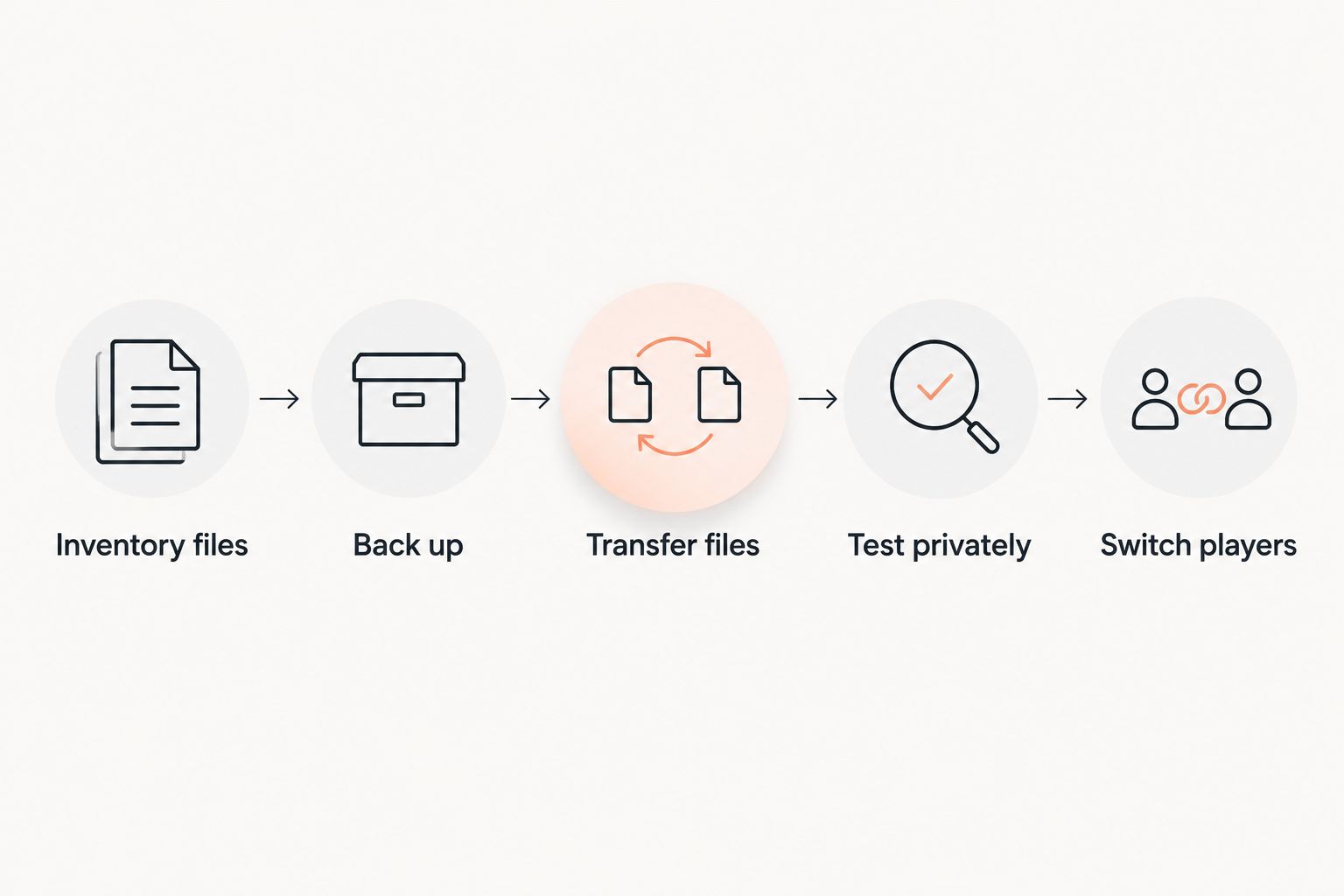
Use a migration sequence that gives you a return path:
- Inventory files: Record versions, startup settings, world locations, configurations, and any pack-specific data directories.
- Back up: Stop the old server cleanly and create a complete export. Keep an independent copy outside the destination server.
- Transfer files: Upload the server environment using the destination’s supported method. Check folder placement and world configuration.
- Test privately: Start the copied server and check logs, player inventories, important locations, machines, permissions, and connection details.
- Switch players: Stop changes on the old server, transfer the final saved state, validate it, and then share the new connection details.
Do not let players build independently on both copies during the changeover. Those worlds diverge, and copying one over the other discards changes from the replaced copy.
Ask Newlifehost’s team, which runs New Life SMP, what migration help covers for your server. Confirm responsibility for file transfer, configuration, validation, and the final changeover. Migration help is not a promise of free service, included tasks, or a fixed downtime limit.
What should you ask before buying a plan?
Send the host your exact pack name and release, the required loader, and whether you are starting fresh or moving an existing world. For a running server, describe the observed problem and include relevant logs rather than asking for a RAM figure without context.
Ask these questions before your 2026 purchase:
- Can this plan run the pack’s required Java and loader versions?
- What RAM, CPU, storage, and network limits apply?
- Can you upload server files and inspect startup errors?
- How do backups, downloads, and restores work?
- What happens to files when you upgrade or cancel?
- Which installation and migration tasks will support handle?
Clear monthly billing matters, but compare the operational requirements alongside it. Check the current USD billing terms, renewal conditions, and any separately billed services. A plan that lacks the access your pack requires is the wrong purchase regardless of its entry cost.
Does more RAM fix modded Minecraft server lag?
More RAM addresses memory pressure, not every cause of lag. Check memory use alongside tick timing and logs. When an overloaded tick loop is the problem, investigate active chunks, entities, machines, world generation, and configuration rather than treating memory as the only adjustment.
Can you keep your existing modded world when switching hosts?
You can transfer an existing world when the destination supports its server environment. Preserve the associated files and versions, then test a copy before changing the public connection details. A world-folder upload alone does not establish that inventories, mod data, and server configuration transferred correctly.
FAQ
What's the best way to choose modded Minecraft server hosting?
Choose modded Minecraft server hosting by matching the exact pack, loader, Java requirements, and workload. Then compare resource limits, file access, backups, and support scope.
How much RAM does a modded Minecraft server need?
RAM requirements depend on the pack and active workload, not player count alone. Start with the pack author's requirements and check memory use during representative play before changing the allocation.
Is Forge better than Fabric for a hosted modpack?
Use whichever loader the modpack requires. Forge and Fabric are different mod environments, so choosing the other loader does not preserve compatibility.
Can Paper run my Forge or Fabric modpack?
Paper alone does not run a Forge or Fabric modpack. Use the loader and server distribution specified by the pack instead of treating plugin support as modpack support.
Is Newlifehost suitable for modded Minecraft servers?
Newlifehost supports Forge and Fabric through its custom panel and provides DDR5/NVMe hardware. Its stated features include Modrinth modpack installation; confirm the exact pack release, allocation, and migration scope before buying.
How much does modded Minecraft server hosting cost in 2026?
Check the provider's current monthly terms for the allocation your pack requires. Compare renewal billing, resource limits, backups, and separately billed services rather than judging the plan only by its entry cost.
What tick rate should a Minecraft server maintain?
Minecraft's normal server target is 20 ticks per second, corresponding to a 50 ms tick budget. Sustained tick processing above that budget prevents the server from maintaining its normal simulation rate.
One last thing
A backup becomes useful when you can restore it. Before opening your 2026 server to the community, restore a copy into a separate test environment and confirm that it starts with the intended pack and saved world.
That exercise checks more than file retention: it reveals whether you understand the folder structure, startup requirements, and recovery process. Put down roots only after you know how to recover the world.