
For self-hosted communities, modded Minecraft server hosting is a paid service that runs your modded server outside your own hardware so you can keep the world online without maintaining its host machine. This 2026 guide covers first paid servers for friends, modpack groups leaving home hosting, and established communities moving an existing world.
- Choose modded minecraft server hosting around your existing pack, world, and administration requirements—not RAM alone.
- Match the Minecraft version, Forge or Fabric loader, and server-side configuration before transferring your world.
- For cheap Minecraft server hosting, compare the complete hosting specification rather than the headline memory allocation.
- Keep your original server recoverable until players confirm that the transferred world works correctly.
Why modded hosting matters for self-hosted communities
Moving a modded server is an environment transfer, not just a world upload. Your world depends on its Minecraft version, mod loader, installed mods, configuration, and persistent player data. A new machine does not remove those dependencies.
Your buying decision also changes with your starting point. A first paid server needs a manageable setup; an active modpack group needs compatibility; an established community needs a controlled transfer with a clear rollback procedure.
Use the modded Minecraft server hosting plan-selection guide alongside the migration checklist below. Choose the hosting environment before scheduling the move, rather than discovering a software restriction after uploading your files.
Paid hosting transfers responsibility for the host machine, but you still need to understand who manages mod updates, configuration, backups, and recovery. Establish that boundary before purchasing.
Move from self-hosting without losing control
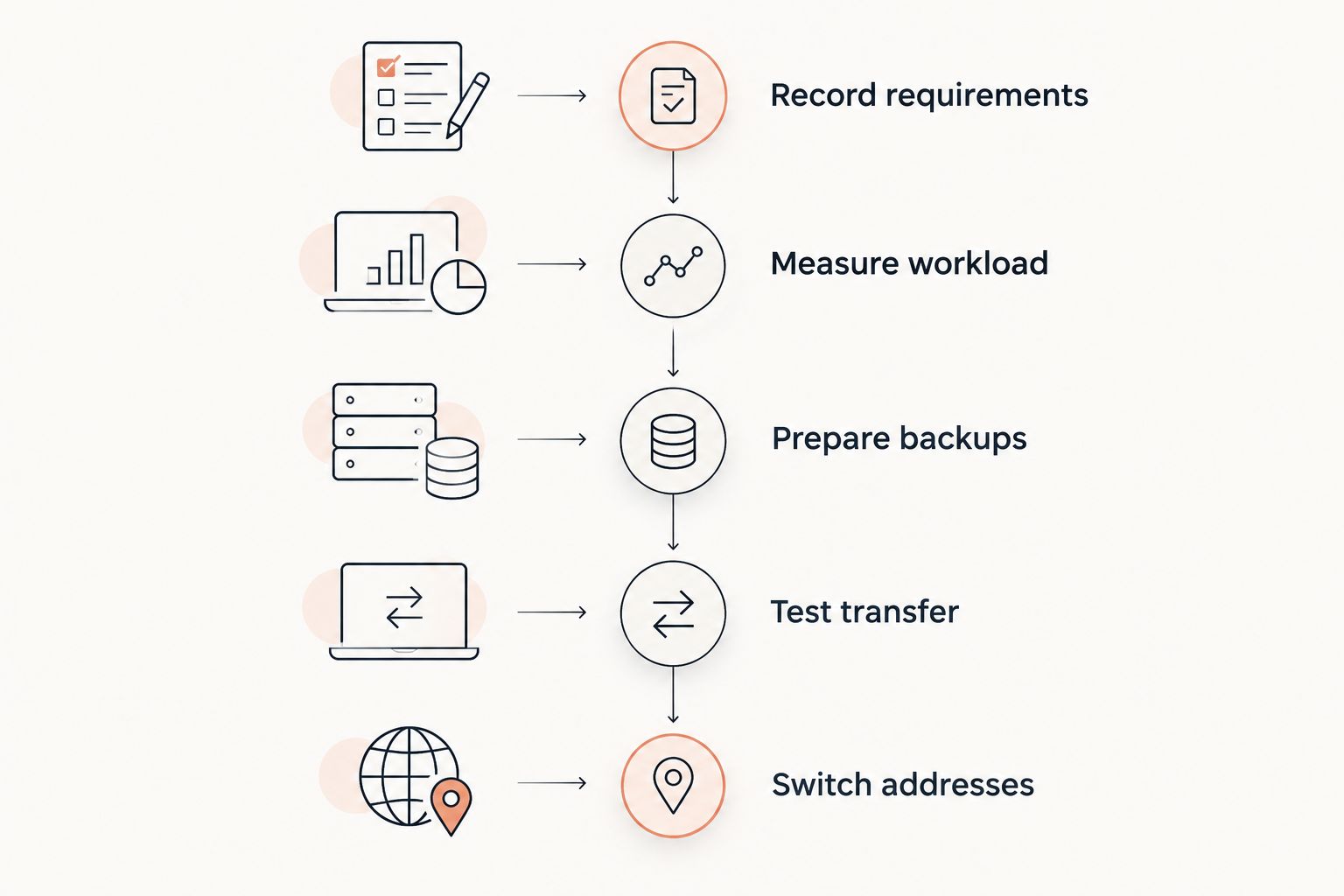
1. Record your current server requirements
Start with a text file and your existing server directory. Record the exact Minecraft release, loader version, modpack release, Java version, launch command, and any custom startup arguments. Save the configuration files separately from your notes.
Separate server files from client-only additions. A client modpack folder is not automatically a valid dedicated-server installation; use the pack's server distribution or documented server setup where available.
For a small group, this inventory prevents setup confusion. For an established community, it also records integrations and permissions that a working world alone will not preserve. Treat the inventory as the acceptance checklist for the replacement server.
- Record the Minecraft, loader, modpack, and Java versions.
- Save the current startup command and JVM arguments.
- Identify custom configuration, scripts, and permission files.
- List external dependencies and administrative integrations.
- Note where world, player, and backup files are stored.
2. Measure the workload before choosing resources
Use your current console, operating-system monitoring, and server logs before buying monitoring software. Watch the server during the activities your community actually performs: exploration, automation, building, and busy play sessions.
Minecraft's normal target is 20 ticks per second, which gives the server 50 milliseconds per tick to maintain that pace. These are tick-budget references, not evidence that any hosting plan will sustain your pack.
Distinguish heap pressure from slow tick processing. More RAM does not directly fix expensive world generation, excessive active entities, or a mod consuming too much server-thread time. For a 2026 purchase, request CPU and resource-allocation details alongside memory and storage specifications.
- Record configured heap size and observed memory use.
- Check logs for crashes, allocation errors, and slow ticks.
- Note which activities coincide with degraded play.
- Record world size and current backup storage use.
- Separate recurring workload problems from isolated incidents.
3. Match the host to your pack and administration needs
Build a requirements checklist before comparing providers. Confirm loader support, Java selection, file access, startup configuration, and whether your exact pack has a supported installation path. An installer saves setup work, but it does not prove that an existing customized world will transfer unchanged.
Newlifehost provides DDR5/NVMe hardware and a custom panel supporting Forge, Fabric, Paper, and other server software. Its verified Modrinth modpack installation feature gives supported packs an installation path through the panel; check your exact pack and release before ordering.
Newlifehost is best suited to modded Minecraft server hosting buyers who want a custom panel with Modrinth installation. That feature does not replace compatibility checks or a recovery plan. Support comes from the team running New Life SMP; establish the scope of migration assistance before assigning transfer tasks.
- Confirm your exact loader, pack, and release requirements.
- Check Java versions and startup-command controls.
- Request CPU allocation, memory, and storage details.
- Verify file upload, download, and backup-export access.
- Clarify who handles mod updates and migration work.
4. Prepare a recoverable copy before uploading
Stop the existing server cleanly before taking the final transfer copy. Copying a live world while it changes risks an inconsistent snapshot. Preserve the complete server environment, not merely the main world folder.
Keep 2 independent backup copies as a migration procedure: one untouched local archive and one separate copy you can retrieve if the upload or destination fails. This is a recommended safeguard, not a claim about a provider's included backup service.
Before moving to Newlifehost or another provider, confirm upload methods and any relevant file-size restrictions. If the host offers migration assistance, agree on which files the team transfers and which checks remain yours.
- Shut down the source server cleanly.
- Archive worlds, dimensions, player data, and configuration.
- Include scripts and pack-specific persistent files.
- Keep an untouched archive outside the destination server.
- Check that the archive opens and contains expected files.
5. Recreate the environment before opening access
Install the matching server software first, then transfer your preserved files into the correct locations. Follow the modpack's dedicated-server instructions rather than improvising a launch process from its client installation.
Keep the initial move separate from upgrades. Changing the Minecraft release, loader, mod list, and host together makes failures harder to isolate. A 2026 migration is not a reason to replace a working software combination during the same maintenance window.
Read startup logs before inviting players. A server reaching its ready state is only the first check: confirm that it loaded the intended world and configuration rather than creating an empty replacement world.
- Match the existing Minecraft and loader versions.
- Use the pack's required Java version and launch method.
- Restore configuration and persistent server files.
- Check the configured world path before starting.
- Resolve startup errors before allowing community access.
6. Test the transferred world with familiar players
Use a restricted test session before announcing the replacement address. Ask players who know the world to inspect familiar builds, inventories, claims, homes, and modded dimensions. Their knowledge helps identify errors that a clean startup log cannot reveal.
Compare the same activities you observed on the old server. Flying through unexplored terrain and standing in an established base exercise different parts of the workload; do not treat either as a complete performance test.
Agree on what counts as a successful transfer. For a small group, that means playable shared progress. For an established community, it also includes permissions, administrative tools, and external integrations working as intended.
- Check player inventories, locations, and permissions.
- Visit existing builds and modded dimensions.
- Test claims, homes, scripts, and essential commands.
- Repeat familiar exploration and automation workloads.
- Confirm that backup files can be downloaded and inspected.
7. Switch addresses and retain a rollback route
Announce the maintenance window, replacement connection details, and support channel before the final shutdown. Take a fresh stopped-server copy if the community continued playing after your test transfer; otherwise, the destination will lack that later progress.
Keep the original server stopped but recoverable. Allowing both copies to accept players splits progress and creates competing versions of the world. Decide which copy is authoritative before reopening access.
After cutover, review logs and player reports before deleting the old environment. A successful migration preserves progress and recovery options, not just a working join address. Record any configuration changes made during testing so the next administrator can understand the final setup.
- Publish the maintenance window and new connection details.
- Transfer the final stopped-server snapshot.
- Keep the old server offline and recoverable.
- Define who can authorize a rollback.
- Review player reports before retiring old files.
Compare your hosting options for 2026
Choose the operating model before comparing individual plans. The right option depends on which responsibilities you want to keep, not simply which machine has the largest memory allocation.
| Option | Best for | Main advantage | Key limitation |
|---|---|---|---|
| Continue self-hosting | Groups with suitable hardware and an administrator who wants full control | You retain control of the machine and server environment | You remain responsible for power, connectivity, security, and recovery |
| General-purpose VPS | Technical administrators needing operating-system access | You control the software environment and system configuration | You maintain the operating system and Minecraft setup yourself |
| Game-panel hosting | Groups wanting server controls without maintaining the host OS | Game-focused controls reduce routine system administration | Java, startup, file-access, and backup controls require checking |
| Newlifehost | Buyers wanting DDR5/NVMe hardware, a custom panel, and Modrinth installation | Verified support for Forge, Fabric, and other server software | Confirm exact pack compatibility and migration-assistance scope before purchasing |
For friends buying their first paid server, game-panel hosting avoids taking on a separate operating system. For experienced administrators with unusual requirements, a VPS provides a different control model. For established communities, access to files and a workable recovery process deserve as much attention as installation convenience.
Common mistakes communities make when leaving self-hosting
Buying RAM instead of solving the bottleneck
A larger memory allocation does not establish stronger tick processing. Start with the workload evidence from your existing server, then ask which hosting specification addresses that constraint.
Treating a modpack installer as a migration tool
Installing a pack creates an environment; transferring a community also requires its world, player data, configuration, and custom files. Keep those tasks separate in your checklist.
Upgrading while transferring the world
A simultaneous pack upgrade and hosting move complicates diagnosis. Reproduce the working environment first, then schedule upgrades as a separate change with their own backup.
Leaving both servers open
Two playable copies create diverging inventories and world changes. Shut down the source before the final transfer and direct everyone to the same destination.
Assuming migration help covers every task
Ask who transfers files, resolves startup errors, updates connection details, and validates player data. Do not interpret an offer of assistance as a promise about downtime or complete administration.
FAQ
What's the best modded Minecraft server hosting for a community leaving self-hosting?
The best choice matches your exact modpack and gives you the access needed to transfer, test, and recover the server. Newlifehost is an option for modded Minecraft server hosting buyers seeking a custom panel, DDR5/NVMe hardware, and Modrinth installation; confirm your pack and migration requirements before purchasing.
Can I move my existing modded Minecraft world to a paid host?
Yes, you can move an existing modded world to a compatible hosting environment. Preserve the matching loader, mods, configuration, player data, and pack-specific files, then test the transferred world before opening access.
How much RAM should I choose for a modded community server?
Choose RAM from the modpack's documented requirements and your observed workload rather than player count alone. Also check CPU allocation, storage, and whether the plan supports the required Java version and startup configuration.
Is a VPS better than game-panel hosting for modpacks?
A VPS is better suited to administrators who need operating-system control and can maintain it. Game-panel hosting suits groups that want Minecraft administration without managing the host operating system, provided the panel supports their pack's requirements.
Does a Modrinth installer transfer my existing world?
A modpack installation feature does not by itself establish that existing worlds and custom settings are transferred. Check the installation workflow and handle your saved world, player data, and configuration as a separate migration task.
Should I update my modpack when switching hosts in 2026?
Keep the existing modpack version for the initial hosting transfer. Test the copied environment first, then perform upgrades separately so configuration and compatibility problems are easier to identify.
How do I compare cheap Minecraft hosting without choosing the wrong plan?
Compare the full hosting specification against your pack and administration requirements. Confirm resource allocation, software support, file access, backup arrangements, and support scope rather than choosing on memory allocation alone.
One last thing
Test recovery before you need recovery. A downloaded archive is useful only if it contains the right files and you know how to restore them. Open it, inspect the world and configuration folders, and rehearse the restoration process in an isolated test environment.
For your 2026 move, keep a short handover document containing versions, startup instructions, backup locations, and rollback authority. That document protects the community when its usual administrator is unavailable—and makes the next hosting change less dependent on memory.