
Cheap Minecraft server hosting is a good buy when the renewal charge, billing commitment, and required extras fit your budget—not just the advertised entry offer. For a 2026 purchase, compare the cost of running your actual world, including its software requirements and any separately charged services, before choosing a plan.
- Choose cheap minecraft server hosting by renewal terms and required features, not the opening offer alone.
- Newlifehost offers Minecraft server hosting with DDR5, NVMe, and a custom panel supporting Paper, Forge, and Fabric.
- Modded Minecraft server hosting needs a compatibility check before a billing commitment.
- Confirm backup, migration, cancellation, and upgrade terms before paying; do not assume they are included.
Why this matters
A hosting plan has to support the server you intend to run. A small group starting a world, modpack players leaving self-hosting, and a community moving an existing server have different requirements—even when all three want a smaller bill.
Newlifehost provides Minecraft server hosting with DDR5/NVMe hardware and a custom panel supporting Paper, Forge, Fabric, and other software. Those are concrete features to evaluate; they do not establish a renewal policy, backup allowance, or performance guarantee. Your 2026 buying decision still needs a check of the actual billing terms.
What does cheap Minecraft server hosting really cost?
The useful comparison is the total charge for the same server requirements over the same period. An introductory payment and an ongoing monthly charge are not interchangeable. Neither are a bare hosting plan and a checkout basket containing optional services.
Use this sequence before entering payment details:
- Record the opening charge. Identify the billing period it covers and whether it depends on a promotion or commitment.
- Find the renewal charge. Confirm what you pay after the opening period and when that change takes effect.
- Separate required features. List what your world needs, including the correct server software and access to its files.
- Review added services. Check whether selected backup, installation, or management services add a recurring charge.
- Compare equal periods. Calculate the total over 12 months, including renewal and required extras, rather than comparing headline figures.
For an ongoing monthly plan, multiply the confirmed monthly charge by 12 months and add any required fees. For an introductory deal, add the opening-period total to the renewal-period total covering the rest of the same 12 months.
Keep upfront payment separate from total cost. A commitment can fit your annual budget while still demanding more cash at checkout than you want to spend.
What should you record before comparing hosts?
Save the plan description, billing interval, renewal terms, and selected extras together. Record the date you checked them, because an old comparison is not a substitute for the terms attached to your order.
Also distinguish a stated feature from an assumption. A panel that supports a mod loader does not, by itself, promise managed troubleshooting for every modpack that uses it. A backup feature does not tell you its retention period unless that period is stated.
Which billing option fits your server in 2026?
Choose the commitment after deciding how long you expect to keep the server. A temporary world and an established community should not automatically choose the same billing schedule.
| Billing option | Best for | Main advantage | Main trade-off | Check before paying |
|---|---|---|---|---|
| Monthly billing | A first server or an uncertain modpack project | Shorter initial commitment | You must compare its ongoing charge with longer commitments | Renewal amount and cancellation deadline |
| Longer-term billing | A community with a defined hosting budget | A known billing period for planning | More money committed before you have used the full period | Refund terms and treatment of unused time |
| Introductory offer | Buyers willing to track a change in billing | An opening offer can reduce the initial payment | The first charge does not describe the ongoing bill | Offer duration, renewal amount, and eligibility |
These are billing structures, not performance tiers. Paying for a longer period does not establish that the server receives different hardware, more memory, or better support.
For a first server, favor a commitment you can evaluate before extending it. The limitation is straightforward: shorter billing is not proof of a lower total cost. Compare the actual terms rather than treating either monthly or longer-term billing as automatically cheaper.
For an established community, consider continuity alongside the bill. Set a renewal reminder, identify who controls the account, and keep payment administration separate from access to the world files.
Which paid extras deserve a closer look?
An extra is useful when it solves a requirement you actually have. Do not add services solely because checkout presents them, and do not remove them solely to make the opening payment smaller.
The categories below are checks to make with any prospective host, not claims that a particular provider charges for them.
Backups and recovery
Ask whether backups are included, where they are stored, and how restoration works. Confirm whether you can download a copy independently of the hosting account.
The benefit of a managed backup feature is convenience. Its limitation is that a button labeled backup does not explain retention, storage separation, or recovery scope. Keep a separate copy of your world before making a major change.
Modpack installation and troubleshooting
Installation and ongoing troubleshooting are different services. A panel can install a modpack without including diagnosis of every crash, incompatible mod, or configuration problem afterward.
Check that your intended pack, loader, and version fit the installation route. Newlifehost's custom Minecraft server hosting panel includes Modrinth modpack installation features; verify the intended pack and version before ordering. That feature does not replace checking the pack's server requirements.
Migration assistance
Moving assistance matters most when you already have a world, player data, plugins, or a configured modpack. Ask which files the team transfers and which parts remain your responsibility.
Newlifehost identifies migration help as a service differentiator, with support from the team running New Life SMP. Confirm the scope before relying on it: do not assume free migration, a downtime limit, or included troubleshooting. Assistance is useful only when both sides understand the handoff.
Additional capacity
An upgrade should answer an identified requirement. Check the resources attached to each plan and how a change affects billing before deciding that a larger allocation is necessary.
More memory is not a universal fix for lag. CPU-bound work, world generation, software configuration, and problematic mods require investigation rather than an automatic memory upgrade.
Why the total hosting bill varies
The total changes when the commitment, resources, or service requirements change. Keep these factors visible instead of reducing the decision to one advertised figure:
- Billing period: Compare the upfront payment and total commitment separately.
- Renewal terms: Establish whether the opening charge continues or changes after an introductory period.
- Server requirements: Match the plan to the actual world, software, mods, and expected activity.
- Selected services: Distinguish included features from optional installation, backup, or management work.
- Moving requirements: Clarify the work needed to transfer an existing server and verify it afterward.
- Upgrade terms: Check how resource changes affect the current billing period and future renewals.
Hardware specifications belong in that assessment, but they need context. DDR5 describes a memory generation; NVMe describes a storage interface. Neither specification alone establishes the performance of your particular Minecraft world.
Compare stated resources and terms, then validate the server under your workload. Do not turn a hardware label into a promised player capacity.
How should each type of server owner choose?
First paid server with friends
Best for: a small group replacing an improvised setup with paid hosting. Start with your intended Minecraft edition, server software, and whether the group actually needs mods or plugins. Avoid paying for a more complicated setup than you plan to use.
The advantage of a simple setup is fewer components to configure. The trade-off is that choosing only around today's requirements can mean revisiting the plan when the group adds a modpack or changes the world.
Modpack players leaving self-hosting
Best for: players who already know which pack they want to run. Begin with the pack's server requirements, loader, version, and installation instructions. Use the existing setup as evidence instead of choosing from an unrelated player-count label.
Paid hosting moves the server off your own machine, but it does not remove mod compatibility work. Keep the original server files until the hosted copy has passed your checks.
Established communities switching hosts
Best for: communities with an existing world and a defined operating routine. Prioritize file access, migration scope, software compatibility, backups, and account ownership alongside renewal terms.
A lower bill is useful, but switching introduces transfer and verification work. Do not cancel the old service until the replacement has the world, player data, and configuration your community expects.
What should you check before paying in 2026?
Use a short pre-purchase workflow rather than trying to remember the details at checkout. Each stage should produce something you can check later.
- Define requirements. Write down the software, Minecraft version, modpack or plugins, and files you need to transfer.
- Check compatibility. Confirm support for that setup and identify any manual installation work.
- Record renewal. Save the billing interval, ongoing charge, selected extras, and cancellation terms.
- Verify recovery. Establish how you will back up, download, and restore the world.
- Plan the move. Agree on responsibilities and test the replacement before retiring the original.
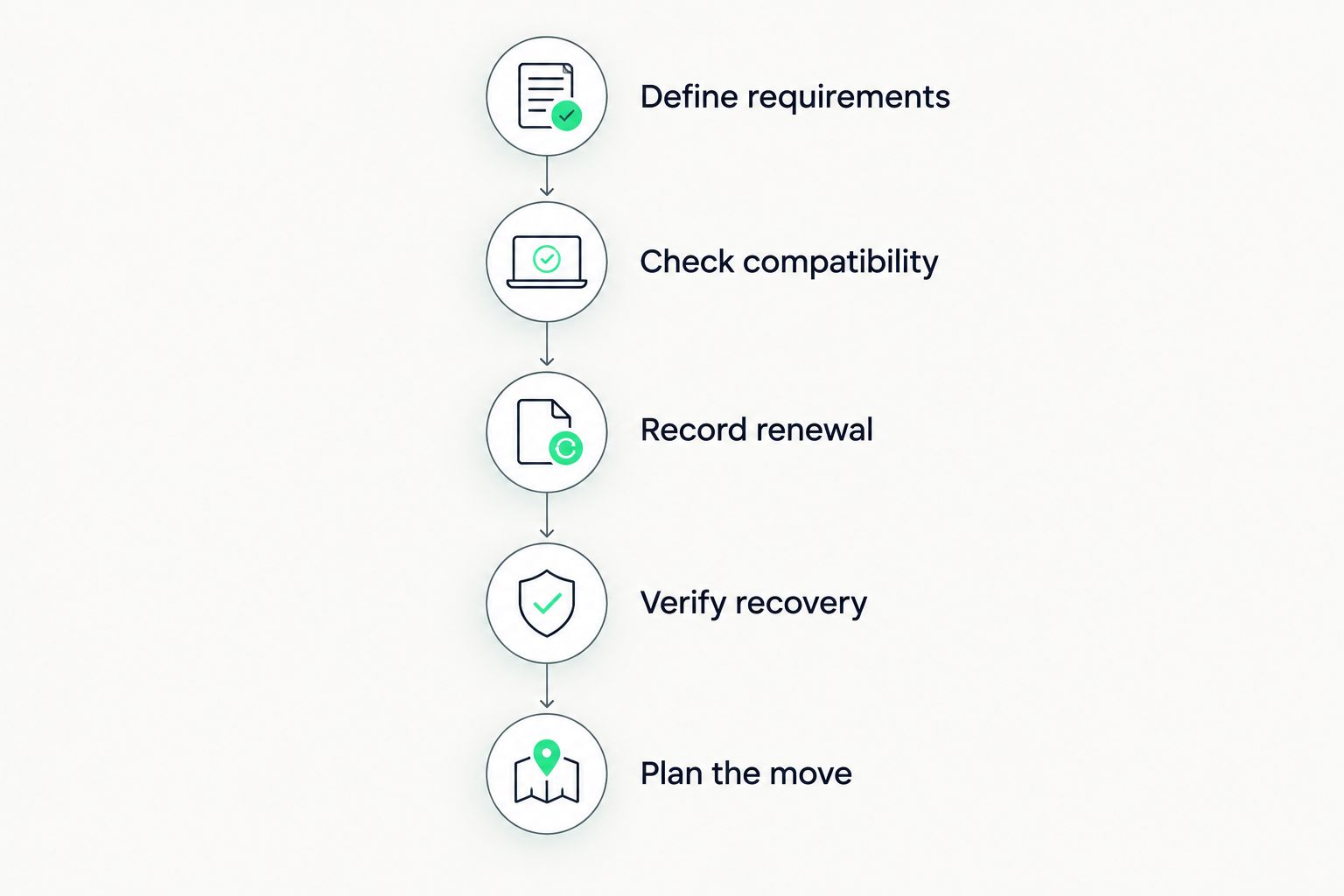
For a new world, the workflow ends with checking the configuration before inviting everyone. For an existing community, it ends with a controlled handover and a retained copy of the original files.
Is monthly billing better for a short Minecraft project?
A 1-month billing period fits a project you want to reassess quickly, provided the renewal and cancellation terms match that plan. Its advantage is a shorter commitment, not an automatic saving.
For a project expected to run for 3 months, compare the confirmed total for those 3 months. Do not choose a longer commitment solely because its displayed monthly equivalent looks smaller.
Can I move an existing world to cheaper hosting?
You can transfer an existing world when the destination supports the required server setup and gives you the necessary file access. Preserve the world, configuration, and relevant player data before making changes.
Test the transferred copy before directing players to it. Migration assistance does not remove the need to verify inventories, permissions, dimensions, and any modded content relevant to your server.
Does more RAM make cheap hosting a better deal?
More RAM is useful when your server needs that memory; it is not proof of better value by itself. Compare the allocation with your workload and investigate the cause of any performance problem.
A plan with unused memory can still be a poor fit if its software support, billing terms, or transfer process does not meet your requirements.
FAQ
What's the best way to compare cheap Minecraft server hosting?
Compare the total charge over the same period for the same server requirements. Include renewal terms and required extras, then check software compatibility, file access, and recovery options.
Do introductory hosting offers stay the same at renewal?
The offer's billing terms determine the renewal charge. Confirm the ongoing amount and the date it takes effect before paying.
Should I pay monthly for my first Minecraft server?
Monthly billing suits a first server when you want a shorter initial commitment. Compare its total cost and cancellation terms rather than assuming it is the cheapest option.
Does modpack installation include fixing crashes?
Modpack installation does not establish that ongoing crash troubleshooting is included. Ask what installation support covers and what happens when mods conflict or a pack needs configuration changes.
Can I cancel my old host as soon as the files are uploaded?
Keep the old server until you have verified the replacement. Check the world, player data, configuration, and required plugins or mods before completing the handover.
Are DDR5 and NVMe enough to prove a host is faster?
DDR5 and NVMe specifications alone do not prove better Minecraft server performance. Evaluate the stated resources, software setup, and behavior of your actual workload.
What should I ask about Minecraft server migration help?
Ask which files are transferred, who checks the result, and whether the work carries a separate charge. Confirm scheduling and responsibilities without assuming free service or a downtime guarantee.
One last thing
Keep a downloadable copy of your world before switching hosts or changing server software. A backup you control preserves your ability to move again; it also gives you an original to compare against after a transfer.
For a 2026 hosting purchase, write the renewal date beside the renewal charge before checkout. That small record makes the next bill a planned decision rather than a surprise.