
Cheap Minecraft server hosting fits groups that need an ongoing server and a paid plan that supports their software; free hosting fits groups testing whether they want a server at all. Payment alone does not establish performance or control: compare the actual software support, resource limits, backup access, and world-export rules before choosing.
- Choose cheap minecraft server hosting for ongoing play when the plan meets your software, access, and backup requirements.
- Free Minecraft hosting fits experiments; check startup rules, resource limits, and world exports before building a lasting world.
- Newlifehost Minecraft server hosting fits groups seeking DDR5, NVMe storage, and Paper, Forge, or Fabric support.
- Modpack players should confirm the exact pack version and server files before moving an existing world.
Cheap Minecraft hosting vs free hosting: which fits your group?
Choose the hosting arrangement around your group's requirements, not the word free or paid. A temporary test world and an established community need different things from a server.
For a paid reference point, Newlifehost provides Minecraft server hosting with DDR5 memory, NVMe storage, and a custom panel supporting Paper, Forge, Fabric, and other software. Those are useful specifications, but they do not establish how a particular world will perform.
| Hosting option | Best for | Main benefit | Main trade-off | Check before choosing |
|---|---|---|---|---|
| Free hosted server | Groups testing a world or server setup | You can evaluate hosted play without a paid hosting subscription | You must establish whether the service's limits fit ongoing play | Startup rules, software support, backups, and world exports |
| Cheap paid hosting | Groups ready to maintain an ongoing server | You can select a plan against stated resource and software requirements | A subscription does not guarantee adequate resources or unrestricted access | Allocated resources, CPU details, file access, billing terms, and restore options |
| Self-hosting | Owners who want direct machine control and accept administration work | You control the machine and server configuration | You handle networking, security, maintenance, and availability | Connection quality, firewall rules, backups, and administrator availability |
Free hosting is not automatically unsuitable for a lasting world. Paid hosting is not automatically suitable for a demanding modpack. In 2026, the useful comparison is still the same: which arrangement gives your group the access, compatibility, and operating conditions it needs?
Why this matters
A Minecraft world becomes harder to move once players depend on it. Builds are only part of the server: configuration, permissions, inventories, mod data, and backups also matter.
Your choice should protect that work. Before friends start building, establish how you will download the server files and restore a backup. A service that starts a fresh world easily is not necessarily a service that makes an existing server easy to maintain.
Which option fits a first server with friends?
Best for testing the idea: free hosting with suitable software and downloadable world files. Start by asking whether everyone actually wants an ongoing server or just a place to experiment together.
A first server does not need a complicated setup. Choose the Minecraft edition and version, decide whether you need plugins or mods, and identify who will administer it. That prevents you from choosing a service before you know what it must run.
Free hosting earns its place when its documented restrictions fit your sessions. Check whether someone must start the server manually, whether it stops when empty, and whether joining requires waiting. Treat these as provider-specific questions, not universal features of free services.
Best for a continuing group: a paid plan with suitable access and resources. The trade-off is an ongoing bill, so establish what that payment changes for your group. If the free option already meets every requirement, paying solely because a plan sounds more professional solves nothing.
For a first paid server in 2026, keep the buying brief short: compatible software, usable file access, understandable limits, and a backup process you can operate.
Which option fits modpack players leaving self-hosting?
Best for modpack players: hosting that supports the exact pack, loader, and Minecraft version you use. A general promise of mod support is not enough to establish compatibility with an existing server.
Forge and Fabric are different mod-loading environments. Installing one does not make mods written for the other compatible, and changing the Minecraft version can also change which mod files work.
Ask these questions before buying:
- Server files: Does the pack provide a server installation package, and can you upload it?
- Loader version: Can you use the loader version required by the pack?
- Java version: Does the environment support the Java version that server release requires?
- Pack updates: Can you back up the installation before changing versions?
- Configuration access: Can you edit configuration files and retrieve logs?
- World transfer: Can you upload the complete existing server data rather than generate a replacement world?
A panel installer reduces setup work when it supports your chosen pack. It does not replace checking the pack version or protecting an existing world before an update.
The main paid-hosting benefit for this audience is moving machine administration away from home. The trade-off is accepting the host's resource allocation and panel permissions rather than controlling the entire computer yourself.
Which option fits an established community switching hosts?
Best for established communities: hosting selected against the current server's workload and migration requirements. Start with what your server actually runs, not a generic player-capacity label.
Record the server software, Minecraft version, plugins or mods, world directories, configuration files, and any external dependencies. Review logs and resource usage during the sessions that cause problems. A quiet server tells you less about capacity than the workload you are trying to support.
Ask the receiving host which parts of migration it will handle. Separate file transfer from configuration repair, database transfer, modpack troubleshooting, and testing: agreement to help with one does not establish that all are included.
For a community move in 2026, keep the old installation intact until the copied server passes your checks. Confirm that player data, permissions, dimensions, and important server features work before directing everyone to the replacement.
The benefit of switching is choosing a better fit for known requirements. The disadvantage is migration work, so document the problem the new host must solve before committing.
Why the right hosting choice varies
The same plan can suit a simple shared world and fail to meet a different server's requirements. These factors change the decision:
- Software compatibility: A plugin-based Paper server and a Forge or Fabric modpack require different installations. Choose compatible software before comparing plan sizes.
- Resource allocation: Read the RAM allocation and CPU information together. DDR5 describes memory technology; NVMe describes storage technology. Neither states the server's complete capacity.
- Workload: Plugins, mods, loaded chunks, entities, and world generation affect the work the server performs. Player count alone does not describe that workload.
- Access requirements: Console access, editable files, logs, and world downloads determine how much administration you can perform yourself.
- Session expectations: A group meeting for arranged sessions can accept operating rules that do not suit a community expecting independent access.
- Recovery requirements: Backup creation, retention, downloads, and restoration are separate capabilities. Confirm each one rather than treating the word backups as a complete policy.
For cheap Minecraft server hosting in 2026, the right comparison is what the plan lets you run and maintain. A low subscription is not a saving if the plan cannot support the server you intend to keep.
How do you compare performance without invented player limits?
Use the server's actual workload and measurements rather than treating RAM as a player-count calculator. Minecraft Java servers normally target 20 ticks per second, which leaves 50 milliseconds per tick to keep pace.
Those are server timing targets, not promises about any host. They do not tell you how many players a particular plan will support, and allocating more RAM does not automatically fix a CPU-bound workload.
When evaluating a server, reproduce the activity that matters: exploring new terrain, running machines, loading farms, or gathering in a busy area. Inspect server timing information and logs alongside memory usage. Separate connection latency from slow server processing; they are different problems.
For a buying decision, request the CPU model and allocation details instead of accepting a performance adjective. Then establish whether the plan provides enough information and access to diagnose problems after purchase.
How do you move an existing world safely?
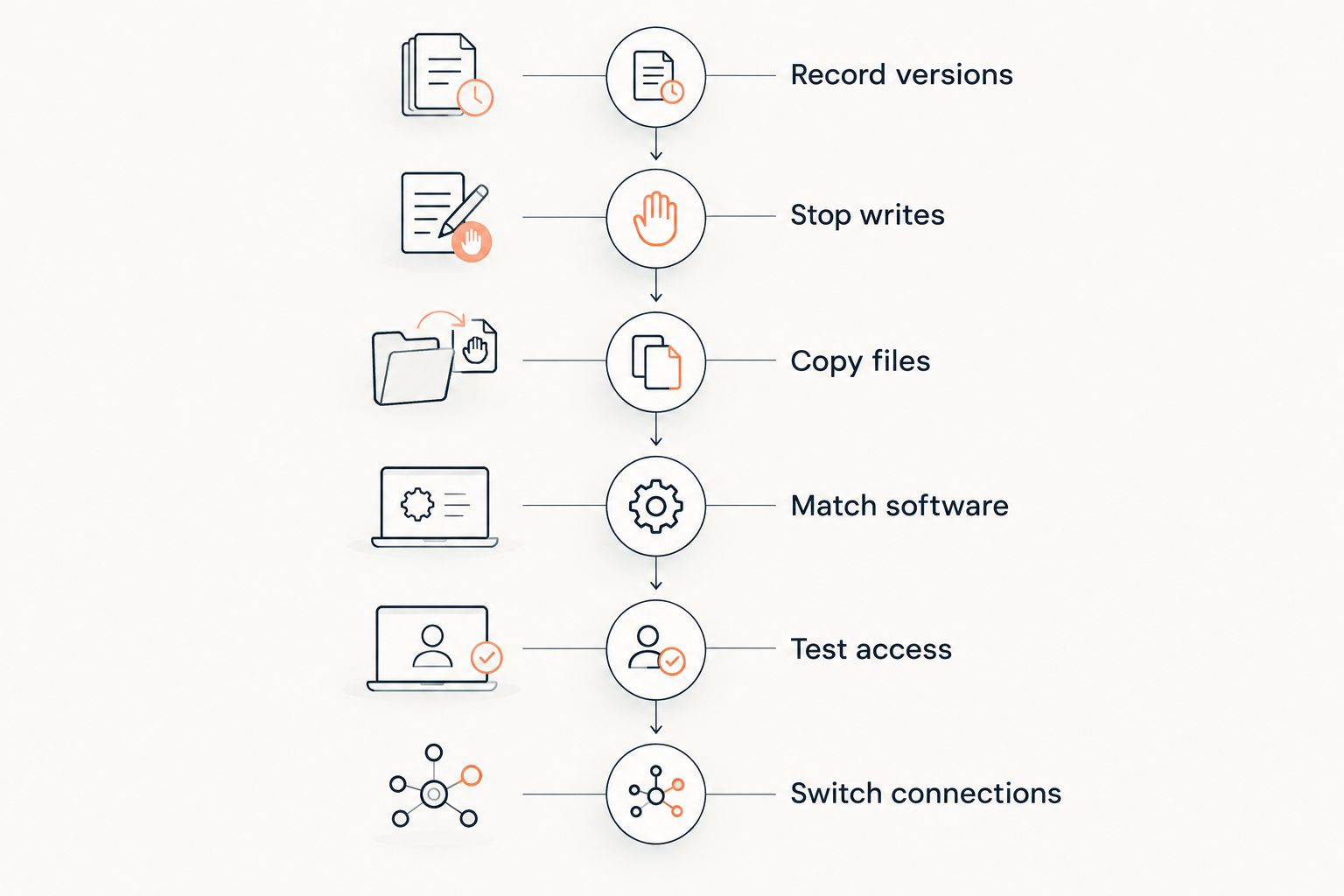
Move a server as a controlled copy, not an untested replacement. In 2026, the essential rule remains: preserve a recoverable original before changing the environment.
- Record versions. Note the Minecraft release, server software, loader, Java requirements, and installed plugins or mods.
- Stop writes. Save the server and stop it cleanly before taking the final transfer copy.
- Copy files. Download the world directories, configuration, player data, and required supporting files. Keep an independent backup.
- Match software. Prepare the destination with the same compatible software and versions before loading the copied world.
- Test access. Check inventories, permissions, dimensions, plugins, and modded content before reopening the server to the group.
- Switch connections. Share the new address only after testing, and keep the previous installation available for recovery.
Minecraft Java's default server port is 25565, but a hosting provider can assign a different port. Use the destination's supplied connection details rather than assuming your old address or port carries across.
Avoid upgrading the pack during the transfer unless the upgrade itself is the planned project. Changing hosts and software together makes it harder to identify the cause of a broken server.
Is free hosting enough for a modded Minecraft server?
Free hosting is enough only when its supported software, resources, and file controls meet the modpack's requirements. The free label does not answer those questions.
Check the exact loader and version, whether server files can be uploaded, and whether you can retrieve logs and backups. If an essential requirement fails, choose another arrangement rather than trying to force the pack into an incompatible setup.
Does cheap paid hosting automatically prevent lag?
Cheap paid hosting does not automatically prevent lag. Server configuration, workload, CPU resources, memory pressure, and network conditions still matter.
Keep the comparison practical: identify the bottleneck you are trying to address and ask which plan detail addresses it. Switching subscriptions without diagnosing the problem is not a performance strategy.
FAQ
What's the best cheap Minecraft server hosting for a small group?
The best fit is a plan that supports your chosen server software, gives you usable file and backup access, and matches your workload. Compare those requirements before relying on a player-capacity label.
Is free Minecraft hosting better than paid hosting?
Free hosting is better for testing when its documented limits fit your group; paid hosting fits ongoing use when a suitable plan provides what you need. Neither category guarantees performance or compatibility.
Does more RAM make a Minecraft server faster?
More RAM helps when insufficient memory is the problem, but it does not automatically fix CPU-bound processing or network latency. Minecraft Java servers normally target 20 ticks per second, so inspect server timing as well as memory usage.
Can I move my existing Minecraft world to another host?
You can move an existing world when you can export its files and the destination supports a compatible server environment. Preserve the original, transfer the supporting configuration, and test the copy before reopening it.
Does Newlifehost support modded Minecraft servers?
Newlifehost Minecraft server hosting supports Forge and Fabric through its custom game panel. Confirm the exact modpack, loader, Minecraft version, and installation requirements before choosing a plan.
What should I check before leaving self-hosting?
Check software compatibility, file access, resource allocation, backups, connection details, and migration responsibilities. Moving to hosted infrastructure changes who controls the machine, so confirm which administrative tasks remain yours.
Should I choose a hosting plan by player count?
Do not choose by player count alone. Mods, plugins, loaded chunks, entities, and world generation also affect the workload, so compare the plan with how your server actually runs.
One last thing
Test a backup restore before the world becomes valuable. Downloading a file establishes that you have a copy; starting a compatible server from that copy establishes that you can use it.
For groups considering Newlifehost, confirm the exact pack setup and migration scope before ordering. Hardware specifications belong in the decision, but a recoverable world and a supported installation belong there too.