

For modded Minecraft server hosting, choose Forge, Fabric or NeoForge to match your modpack’s exact Minecraft version and loader requirements—not a host’s default installer. These loaders are not interchangeable, and choosing paid hosting still requires checking the pack’s server files, Java requirements, resource needs and update process.
- Choose modded Minecraft server hosting around your modpack’s required Forge, Fabric or NeoForge loader.
- New Life Host suits server owners seeking paid Minecraft hosting with a custom panel and Modrinth modpack installation.
- Match the Minecraft version, loader version and required mods before uploading an existing world.
- Choose resources from the pack’s requirements and your actual workload, not the loader name alone.
Why this matters
The wrong loader is a compatibility problem, not a shortage of RAM. A larger hosting plan does not make a Forge mod work on Fabric or turn a NeoForge server into a compatible destination for an existing Forge pack.
For a 2026 hosting decision, settle the software requirements before comparing plans. A first server with friends needs a repeatable installation. A group leaving self-hosting needs its existing pack reproduced. An established community needs a migration process that preserves the world and gives administrators a way back if testing fails.
New Life Host provides Minecraft server hosting with DDR5 memory, NVMe storage and a custom game panel. Those specifications belong in your comparison, but they do not replace checking the exact pack and loader you intend to run.
Modded Minecraft hosting: Forge, Fabric or NeoForge?
Use the loader your chosen modpack requires. If you are building a pack yourself, start with the mods you cannot do without, then find a Minecraft version and loader supported by that collection.
| Loader | Best for | Main advantage | Main trade-off | Check before buying hosting |
|---|---|---|---|---|
| Forge | Players running packs or mods explicitly built for Forge | Keeps an existing Forge pack on its intended platform | Forge compatibility does not imply Fabric or NeoForge compatibility | Exact Minecraft version, Forge build and server installation instructions |
| Fabric | Players whose chosen mods or pack require Fabric | Provides the required environment for Fabric mods | Forge mods are not drop-in replacements; dependencies still need matching | Fabric Loader version, required libraries and server-side mod list |
| NeoForge | Players whose chosen pack explicitly targets NeoForge | Matches packs developed for the NeoForge ecosystem | Shared history with Forge does not establish compatibility | Exact NeoForge build, pack release and host installation method |
This is a compatibility comparison, not a speed ranking. Loader choice alone does not establish which server will run better: the mods, configuration, CPU resources and active world all affect the result.
Start with the pack, not a loader popularity contest
Open the installation instructions for the exact pack release you want. Record its Minecraft version, loader and server requirements before selecting a host or changing an existing server.
A pack name is not enough. Different releases can target different Minecraft versions or loaders, so an installer listing the right name still needs the right release. For a custom collection, check each required mod’s supported environment and dependencies.
If your friends have already chosen a pack, the loader decision is usually settled. Your buying decision becomes whether the host can install, maintain and back up that specific setup.
Forge: choose it when your pack requires Forge
Forge is the right choice when your intended server pack specifies Forge. Preserve the required Minecraft and loader versions rather than selecting the newest installer entry by habit.
Its practical advantage is compatibility with the Forge content you already want. The trade-off is that you must stay within the supported combination of mods, libraries and game version; a similarly named download for another loader is not a substitute.
For an existing Forge community, moving hosts and changing loaders are separate projects. Move the working Forge setup first, then evaluate software changes on a separate test copy. That keeps a hosting migration from becoming an unplanned modpack conversion.
Fabric: choose it when your mods require Fabric
Fabric is the right choice when the pack or required mods specify Fabric. Check whether the installation also requires Fabric API or other libraries; do not assume every dependency arrives with the loader.
Fabric’s advantage is access to the Fabric mods your setup needs. Its limitation is the same compatibility boundary that applies elsewhere: installing Fabric does not let you upload arbitrary Forge mods and expect them to work.
Do not choose Fabric solely because someone calls it lightweight. A small collection of server-side changes and a content-heavy pack create different workloads, even when both use Fabric. Compare the actual pack requirements before deciding how much hosting capacity to buy.
NeoForge: choose it when the pack targets NeoForge
NeoForge is the right choice when your pack explicitly requires NeoForge. Confirm the supported loader build and Minecraft version together, rather than treating NeoForge as a generic replacement for Forge.
The advantage is alignment with a pack developed for NeoForge. The trade-off is that a host advertising Forge installation has not necessarily confirmed NeoForge installation, startup configuration or support for your particular pack.
For a 2026 purchase, ask about the exact release you intend to run. A useful answer explains the installation route and any manual steps; a general statement that the host supports mods leaves the important question unanswered.
Why modded Minecraft hosting requirements vary
Loader names do not provide a complete sizing guide. Compare these factors before committing to a plan:
- Pack requirements: Start with the pack author’s server guidance and required Java version. Treat those instructions as the baseline, not a guarantee for every community.
- Concurrent activity: Players exploring separate areas, operating machines and loading chunks create a different workload from players building together in one location.
- World workload: World generation, loaded entities, automation and chunk-loading features affect server work. A large world file alone does not describe all of that activity.
- CPU allocation: Ask what the advertised vCores represent and whether allocation is shared or dedicated. A core count without its allocation terms is an incomplete comparison.
- Memory and storage: Check usable server memory, storage allowance and how backups count against it. NVMe describes storage technology, not the amount of space included.
- Operational access: Confirm file uploads, startup settings, logs, backups and restoration controls. These determine how much of the server you can manage yourself.
Buy against a defined workload, not an unsupported player-slot claim. In 2026, a hosting comparison is useful only when it separates hardware specifications from promises about how your particular pack will behave.
How do you set up a modded server on paid hosting?
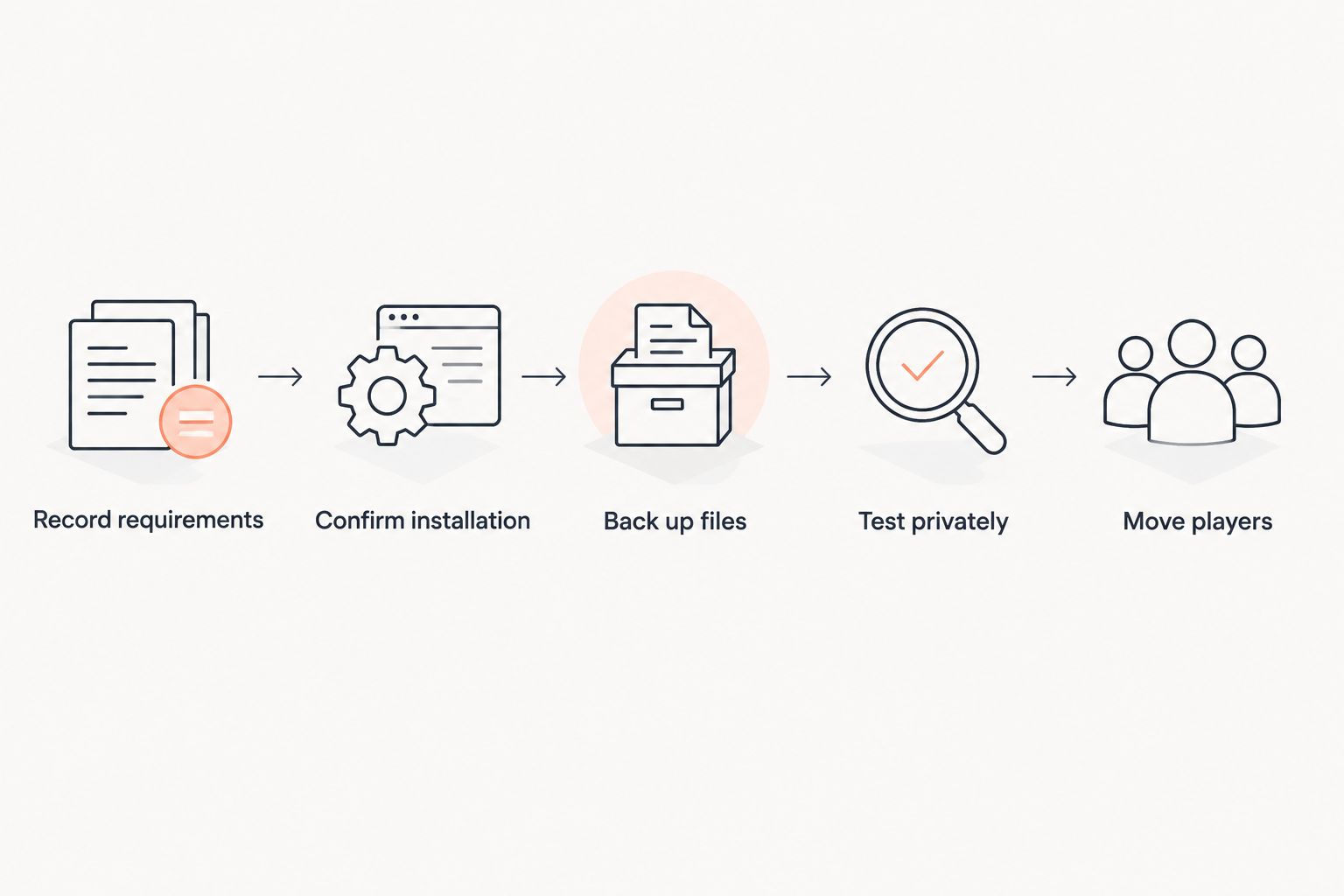
Follow a repeatable sequence whether you are starting fresh or leaving self-hosting. Keep a record of each version so a later repair does not depend on remembering which installer option you selected.
- Record requirements. Write down the pack release, Minecraft version, loader build, Java requirement and installation instructions. Save the server pack when the publisher provides one.
- Confirm installation. Check whether the host installs that exact release through its panel or requires a manual upload. Ask how required startup arguments and Java versions are selected.
- Back up files. For an existing server, stop it cleanly and save a separate copy of the world, mods, configuration and relevant server settings before transferring anything.
- Test privately. Start the destination server without opening it to the whole community. Read the logs, connect with the matching client pack and check important locations and modded features.
- Move players. Announce the change only after testing. Keep the original backup separate from the destination server until you have verified the move.
The first successful startup is not the whole test. Check that inventories, permissions where applicable, modded blocks and expected world content behave correctly before treating the destination as ready.
Which hosting checks matter for your group?
First paid server with friends
Start with the pack everyone agrees to use, then check installation and access controls. You need to know who can restart the server, upload files and restore a backup without sharing the main account unnecessarily.
Favor a setup your group can maintain. The cheapest-looking plan is not a useful saving if it cannot run the required software or leaves you without enough storage for the world and backup process you intend to use.
Modpack players leaving self-hosting
Reproduce the working environment before changing it. Transfer the existing configuration alongside the world, and confirm that the host can use the required Java version and startup settings.
Paid hosting changes where the server runs; it does not remove responsibility for pack compatibility. Keep your previous files and configuration available until the hosted copy has passed testing.
Established communities switching hosts
Separate technical migration from the public cutover. Confirm file-transfer access, backup restoration, administrator permissions and the process for changing the connection details players use.
Ask the destination host exactly what migration assistance includes. Uploading files, diagnosing pack errors and scheduling a community move are different tasks; do not assume they are all covered by the same offer.
Where does New Life Host fit?
New Life Host suits server owners seeking paid Minecraft hosting with a custom panel and Modrinth modpack installation. Its stated hardware includes DDR5 memory and NVMe storage, and its panel supports Forge, Fabric and other server software.
The team also runs New Life SMP, which is relevant when you want to discuss practical server administration. Still, ask specific questions: whether your exact Modrinth pack release is installable, whether NeoForge is supported for that setup, and what migration assistance covers.
The trade-off is that hardware labels and installer features do not establish a pack-specific performance result. Before buying, confirm the plan’s resource allocation, storage, backup arrangements and supported installation route. Do not infer those details from the presence of DDR5 or NVMe alone.
Check hosting against your pack
Compare your loader, pack release and migration requirements before choosing a plan.
Can you switch from Forge to Fabric without changing the world?
A Forge-to-Fabric switch is not a routine world transfer. If the world contains modded blocks, items or dimensions that the destination cannot interpret, changing the loader can remove content or prevent a successful load.
Test a copy with a documented conversion path where one exists. For a straightforward host migration, retain the existing loader and pack instead.
Does NeoForge need a different hosting plan from Forge?
NeoForge needs a compatible installation, not automatically a different plan tier. Choose resources for the actual pack and activity, then verify that the host supports the required NeoForge environment.
A host’s Forge installer is not proof of NeoForge support. Confirm the exact setup before moving files or purchasing hosting for it.
FAQ
What is the best modded Minecraft server hosting setup for friends?
The best setup for friends matches the chosen pack’s exact loader and Minecraft version and gives the group workable installation, backup and administration controls. Choose the pack first, then compare plans against its requirements.
Is Fabric better than Forge for a modded server?
Fabric is better when your required mods target Fabric; Forge is the right choice when they require Forge. Neither loader name alone proves better performance for your particular world and mod collection.
Can I run Forge mods on a NeoForge server?
Do not assume Forge mods run on NeoForge. Check each mod’s stated support for the exact Minecraft and loader versions, or use a pack release explicitly built for NeoForge.
How much RAM does a modded Minecraft server need?
A modded Minecraft server needs memory sized to its pack, configuration and active workload. Start with the pack publisher’s server requirements and assess memory use under representative play rather than choosing from the loader name alone.
Can I upload my existing modded world to a paid host?
You can move an existing modded world when the destination supports the required server environment and file uploads. Transfer the matching mods and configuration, keep a separate backup and test the destination before moving players.
Does a Modrinth installer mean every pack will work?
A Modrinth installer does not establish support for every pack release. Confirm the exact pack, loader, Minecraft version and server installation requirements before relying on an automated installation.
What should I check before buying modded hosting in 2026?
Before buying modded hosting in 2026, verify the exact pack installation route, Java support, resource allocation, storage, backups and file access. If you are moving an existing server, also confirm the scope of migration assistance.
One last thing
Keep the working server unchanged until the replacement passes testing. A host move, loader change and pack update are separate changes; combining them makes failures harder to diagnose.
For your 2026 move, copy first and improve later. A preserved backup and a recorded software version are more useful than a rushed upgrade when the community is waiting to reconnect.